Image
The Image class, representing one medical image,
stores a 4D tensor, whose voxels encode, e.g., signal intensity or segmentation
labels, and the corresponding affine transform,
typically a rigid (Euclidean) transform, to convert
voxel indices to world coordinates in mm.
Arbitrary fields such as acquisition parameters may also be stored.
Subclasses are used to indicate specific types of images,
such as ScalarImage and LabelMap,
which are used to store, e.g., CT scans and segmentations, respectively.
An instance of Image can be created using a filepath,
a PyTorch tensor, or a NumPy array.
This class uses lazy loading, i.e., the data is not loaded from disk at
instantiation time.
Instead, the data is only loaded when needed for an operation
(e.g., if a transform is applied to the image).
Images can be sliced using the standard NumPy / PyTorch slicing syntax. This operation updates the coordinates origin in the affine matrix correspondingly.
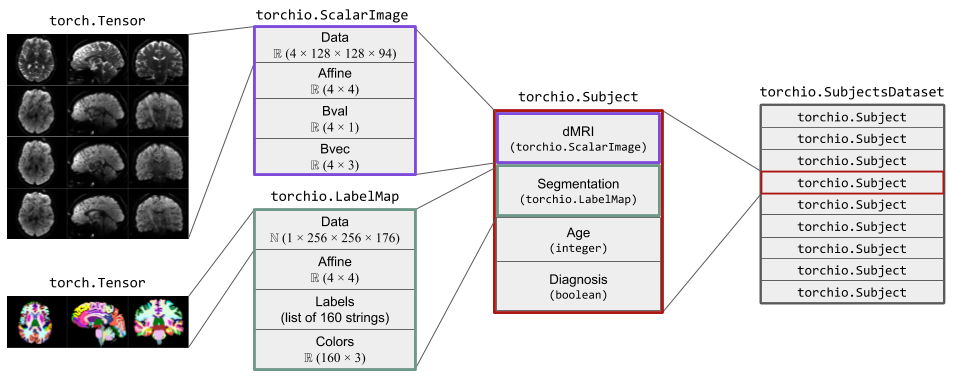
The figure below shows two instances of Image.
The instance of ScalarImage contains a 4D tensor representing a
diffusion MRI, which contains four 3D volumes (one per gradient direction),
and the associated affine matrix.
Additionally, it stores the strength and direction for each of the four
gradients.
The instance of LabelMap contains a brain parcellation of the same
subject, the associated affine matrix, and the name and color of each brain
structure.
ScalarImage
ScalarImage
Bases: Image
Image whose pixel values represent scalars.
Examples:
>>> import torch
>>> import torchio as tio
>>> # Loading from a file
>>> t1_image = tio.ScalarImage('t1.nii.gz')
>>> dmri = tio.ScalarImage(tensor=torch.rand(32, 128, 128, 88))
>>> image = tio.ScalarImage('safe_image.nrrd', check_nans=False)
>>> data, affine = image.data, image.affine
>>> affine.shape
(4, 4)
>>> image.data is image[tio.DATA]
True
>>> image.data is image.tensor
True
>>> type(image.data)
torch.Tensor
See Image for more information.
affine
property
writable
Affine matrix to transform voxel indices into world coordinates.
data
property
writable
Tensor data (same as [Image.tensor][]).
tensor
property
Tensor data (same as [Image.data][]).
shape
property
Tensor shape as \((C, W, H, D)\).
spatial_shape
property
Tensor spatial shape as \((W, H, D)\).
height
property
Image height, if 2D.
width
property
Image width, if 2D.
orientation
property
Orientation codes.
orientation_str
property
Orientation as a string.
spacing
property
Voxel spacing in mm.
origin
property
Center of first voxel in array, in mm.
itemsize
property
Element size of the data type.
memory
property
Number of Bytes that the tensor takes in the RAM.
bounds
property
Position of centers of voxels in smallest and largest indices.
num_channels
property
Get the number of channels in the associated 4D tensor.
set_data(tensor)
Store a 4D tensor in the data key and attribute.
Parameters:
| Name | Type | Description | Default |
|---|---|---|---|
tensor
|
TypeData
|
4D tensor with dimensions \((C, W, H, D)\). |
required |
axis_name_to_index(axis)
Convert an axis name to an axis index.
Parameters:
| Name | Type | Description | Default |
|---|---|---|---|
axis
|
str
|
Possible inputs are |
required |
Note
If you are working with animals, you should probably use
'Superior', 'Inferior', 'Anterior' and 'Posterior'
for 'Dorsal', 'Ventral', 'Rostral' and 'Caudal',
respectively.
Note
If your images are 2D, you can use 'Top', 'Bottom',
'Left' and 'Right'.
flip_axis(axis)
staticmethod
Return the opposite axis label. For example, 'L' -> 'R'.
Parameters:
| Name | Type | Description | Default |
|---|---|---|---|
axis
|
str
|
Axis label, such as |
required |
get_bounds()
Get minimum and maximum world coordinates occupied by the image.
load()
Load the image from disk.
Returns:
| Type | Description |
|---|---|
None
|
Tuple containing a 4D tensor of size \((C, W, H, D)\) and a 2D |
None
|
\(4 \times 4\) affine matrix to convert voxel indices to world |
None
|
coordinates. |
unload()
Unload the image from memory.
Raises:
| Type | Description |
|---|---|
RuntimeError
|
If the images has not been loaded yet or if no path is available. |
save(path, squeeze=None)
Save image to disk.
Parameters:
| Name | Type | Description | Default |
|---|---|---|---|
path
|
TypePath
|
String or instance of pathlib.Path. |
required |
squeeze
|
bool | None
|
Whether to remove singleton dimensions before saving.
If |
None
|
numpy()
Get a NumPy array containing the image data.
as_sitk(**kwargs)
Get the image as an instance of [sitk.Image][].
from_sitk(sitk_image)
classmethod
Instantiate a new TorchIO image from a [sitk.Image][].
Examples:
>>> import torchio as tio
>>> import SimpleITK as sitk
>>> sitk_image = sitk.Image(20, 30, 40, sitk.sitkUInt16)
>>> tio.LabelMap.from_sitk(sitk_image)
LabelMap(shape: (1, 20, 30, 40); spacing: (1.00, 1.00, 1.00); orientation: LPS+; memory: 93.8 KiB; dtype: torch.IntTensor)
>>> sitk_image = sitk.Image((224, 224), sitk.sitkVectorFloat32, 3)
>>> tio.ScalarImage.from_sitk(sitk_image)
ScalarImage(shape: (3, 224, 224, 1); spacing: (1.00, 1.00, 1.00); orientation: LPS+; memory: 588.0 KiB; dtype: torch.FloatTensor)
as_pil(transpose=True)
Get the image as an instance of [PIL.Image][].
Note
Values will be clamped to 0-255 and cast to uint8.
Note
To use this method, Pillow needs to be installed:
pip install Pillow.
to_gif(axis, duration, output_path, loop=0, rescale=True, optimize=True, reverse=False)
Save an animated GIF of the image.
Parameters:
| Name | Type | Description | Default |
|---|---|---|---|
axis
|
int
|
Spatial axis (0, 1 or 2). |
required |
duration
|
float
|
Duration of the full animation in seconds. |
required |
output_path
|
TypePath
|
Path to the output GIF file. |
required |
loop
|
int
|
Number of times the GIF should loop.
|
0
|
rescale
|
bool
|
Use |
True
|
optimize
|
bool
|
If |
True
|
reverse
|
bool
|
Reverse the temporal order of frames. |
False
|
get_center(lps=False)
Get image center in RAS+ or LPS+ coordinates.
Parameters:
| Name | Type | Description | Default |
|---|---|---|---|
lps
|
bool
|
If |
False
|
plot(return_fig=False, **kwargs)
Plot image.
show(viewer_path=None)
Open the image using external software.
Parameters:
| Name | Type | Description | Default |
|---|---|---|---|
viewer_path
|
TypePath | None
|
None
|
Raises:
| Type | Description |
|---|---|
RuntimeError
|
If the viewer is not found. |
hist(**kwargs)
Plot histogram.
to_video(output_path, frame_rate=15, seconds=None, direction='I', verbosity='error')
Create a video showing all image slices along a specified direction.
Parameters:
| Name | Type | Description | Default |
|---|---|---|---|
output_path
|
TypePath
|
Path to the output video file. |
required |
frame_rate
|
float | None
|
Number of frames per second (FPS). |
15
|
seconds
|
float | None
|
Target duration of the full video. |
None
|
direction
|
str
|
|
'I'
|
verbosity
|
str
|
|
'error'
|
Note
Only frame_rate or seconds may (and must) be specified.
LabelMap
LabelMap
Bases: Image
Image whose pixel values represent segmentation labels.
A sequence of paths to 3D images can be passed to create a 4D image.
This is useful to create a
tissue probability map (TPM) <https://andysbrainbook.readthedocs.io/en/latest/SPM/SPM_Short_Course/SPM_04_Preprocessing/04_SPM_Segmentation.html#tissue-probability-maps>,
which contains the probability of each voxel belonging to a certain tissue type,
or to create a label map with overlapping labels.
Intensity transforms are not applied to these images.
Nearest neighbor interpolation is always used to resample label maps, independently of the specified interpolation type in the transform instantiation.
Examples:
>>> import torch
>>> import torchio as tio
>>> binary_tensor = torch.rand(1, 128, 128, 68) > 0.5
>>> label_map = tio.LabelMap(tensor=binary_tensor)  # from a tensor
>>> label_map = tio.LabelMap('t1_seg.nii.gz')  # from a file
>>> # Create a 4D tissue probability map from different 3D images
>>> tissues = 'gray_matter.nii.gz', 'white_matter.nii.gz', 'csf.nii.gz'
>>> tpm = tio.LabelMap(tissues)
See Image for more information.
affine
property
writable
Affine matrix to transform voxel indices into world coordinates.
data
property
writable
Tensor data (same as [Image.tensor][]).
tensor
property
Tensor data (same as [Image.data][]).
shape
property
Tensor shape as \((C, W, H, D)\).
spatial_shape
property
Tensor spatial shape as \((W, H, D)\).
height
property
Image height, if 2D.
width
property
Image width, if 2D.
orientation
property
Orientation codes.
orientation_str
property
Orientation as a string.
spacing
property
Voxel spacing in mm.
origin
property
Center of first voxel in array, in mm.
itemsize
property
Element size of the data type.
memory
property
Number of Bytes that the tensor takes in the RAM.
bounds
property
Position of centers of voxels in smallest and largest indices.
num_channels
property
Get the number of channels in the associated 4D tensor.
set_data(tensor)
Store a 4D tensor in the data key and attribute.
Parameters:
| Name | Type | Description | Default |
|---|---|---|---|
tensor
|
TypeData
|
4D tensor with dimensions \((C, W, H, D)\). |
required |
axis_name_to_index(axis)
Convert an axis name to an axis index.
Parameters:
| Name | Type | Description | Default |
|---|---|---|---|
axis
|
str
|
Possible inputs are |
required |
Note
If you are working with animals, you should probably use
'Superior', 'Inferior', 'Anterior' and 'Posterior'
for 'Dorsal', 'Ventral', 'Rostral' and 'Caudal',
respectively.
Note
If your images are 2D, you can use 'Top', 'Bottom',
'Left' and 'Right'.
flip_axis(axis)
staticmethod
Return the opposite axis label. For example, 'L' -> 'R'.
Parameters:
| Name | Type | Description | Default |
|---|---|---|---|
axis
|
str
|
Axis label, such as |
required |
get_bounds()
Get minimum and maximum world coordinates occupied by the image.
load()
Load the image from disk.
Returns:
| Type | Description |
|---|---|
None
|
Tuple containing a 4D tensor of size \((C, W, H, D)\) and a 2D |
None
|
\(4 \times 4\) affine matrix to convert voxel indices to world |
None
|
coordinates. |
unload()
Unload the image from memory.
Raises:
| Type | Description |
|---|---|
RuntimeError
|
If the images has not been loaded yet or if no path is available. |
save(path, squeeze=None)
Save image to disk.
Parameters:
| Name | Type | Description | Default |
|---|---|---|---|
path
|
TypePath
|
String or instance of pathlib.Path. |
required |
squeeze
|
bool | None
|
Whether to remove singleton dimensions before saving.
If |
None
|
numpy()
Get a NumPy array containing the image data.
as_sitk(**kwargs)
Get the image as an instance of [sitk.Image][].
from_sitk(sitk_image)
classmethod
Instantiate a new TorchIO image from a [sitk.Image][].
Examples:
>>> import torchio as tio
>>> import SimpleITK as sitk
>>> sitk_image = sitk.Image(20, 30, 40, sitk.sitkUInt16)
>>> tio.LabelMap.from_sitk(sitk_image)
LabelMap(shape: (1, 20, 30, 40); spacing: (1.00, 1.00, 1.00); orientation: LPS+; memory: 93.8 KiB; dtype: torch.IntTensor)
>>> sitk_image = sitk.Image((224, 224), sitk.sitkVectorFloat32, 3)
>>> tio.ScalarImage.from_sitk(sitk_image)
ScalarImage(shape: (3, 224, 224, 1); spacing: (1.00, 1.00, 1.00); orientation: LPS+; memory: 588.0 KiB; dtype: torch.FloatTensor)
as_pil(transpose=True)
Get the image as an instance of [PIL.Image][].
Note
Values will be clamped to 0-255 and cast to uint8.
Note
To use this method, Pillow needs to be installed:
pip install Pillow.
to_gif(axis, duration, output_path, loop=0, rescale=True, optimize=True, reverse=False)
Save an animated GIF of the image.
Parameters:
| Name | Type | Description | Default |
|---|---|---|---|
axis
|
int
|
Spatial axis (0, 1 or 2). |
required |
duration
|
float
|
Duration of the full animation in seconds. |
required |
output_path
|
TypePath
|
Path to the output GIF file. |
required |
loop
|
int
|
Number of times the GIF should loop.
|
0
|
rescale
|
bool
|
Use |
True
|
optimize
|
bool
|
If |
True
|
reverse
|
bool
|
Reverse the temporal order of frames. |
False
|
get_center(lps=False)
Get image center in RAS+ or LPS+ coordinates.
Parameters:
| Name | Type | Description | Default |
|---|---|---|---|
lps
|
bool
|
If |
False
|
plot(return_fig=False, **kwargs)
Plot image.
show(viewer_path=None)
Open the image using external software.
Parameters:
| Name | Type | Description | Default |
|---|---|---|---|
viewer_path
|
TypePath | None
|
None
|
Raises:
| Type | Description |
|---|---|
RuntimeError
|
If the viewer is not found. |
count_nonzero()
Get the number of voxels that are not 0.
count_labels()
Get the number of voxels in each label.
Image
Image
Bases: dict
TorchIO image.
For information about medical image orientation, check out NiBabel docs, the 3D Slicer wiki, Graham Wideman's website, FSL docs or SimpleITK docs.
Parameters:
| Name | Type | Description | Default |
|---|---|---|---|
path
|
TypePath | Sequence[TypePath] | None
|
Path to a file or sequence of paths to files that can be read by
[SimpleITK][] or [nibabel][], or to a directory containing
DICOM files. If |
None
|
type
|
str | None
|
Type of image, such as |
None
|
tensor
|
TypeData | None
|
If |
None
|
affine
|
TypeData | None
|
\(4 \times 4\) matrix to convert voxel coordinates to world
coordinates. If |
None
|
check_nans
|
bool
|
If |
False
|
reader
|
Callable[[TypePath], TypeDataAffine]
|
Callable object that takes a path and returns a 4D tensor and a
2D, \(4 \times 4\) affine matrix. This can be used if your data
is saved in a custom format, such as |
read_image
|
**kwargs
|
dict[str, Any]
|
Items that will be added to the image dictionary, e.g. acquisition parameters or image ID. |
{}
|
verify_path
|
bool
|
If |
True
|
TorchIO images are lazy loaders, i.e. the data is only loaded from disk when needed.
Examples:
>>> import torchio as tio
>>> import numpy as np
>>> image = tio.ScalarImage('t1.nii.gz')  # subclass of Image
>>> image  # not loaded yet
ScalarImage(path: t1.nii.gz; type: intensity)
>>> times_two = 2 * image.data  # data is loaded and cached here
>>> image
ScalarImage(shape: (1, 256, 256, 176); spacing: (1.00, 1.00, 1.00); orientation: PIR+; memory: 44.0 MiB; type: intensity)
>>> image.save('doubled_image.nii.gz')
>>> def numpy_reader(path):
...     data = np.load(path).as_type(np.float32)
...     affine = np.eye(4)
...     return data, affine
>>> image = tio.ScalarImage('t1.npy', reader=numpy_reader)
affine
property
writable
Affine matrix to transform voxel indices into world coordinates.
data
property
writable
Tensor data (same as [Image.tensor][]).
tensor
property
Tensor data (same as [Image.data][]).
shape
property
Tensor shape as \((C, W, H, D)\).
spatial_shape
property
Tensor spatial shape as \((W, H, D)\).
height
property
Image height, if 2D.
width
property
Image width, if 2D.
orientation
property
Orientation codes.
orientation_str
property
Orientation as a string.
spacing
property
Voxel spacing in mm.
origin
property
Center of first voxel in array, in mm.
itemsize
property
Element size of the data type.
memory
property
Number of Bytes that the tensor takes in the RAM.
bounds
property
Position of centers of voxels in smallest and largest indices.
num_channels
property
Get the number of channels in the associated 4D tensor.
set_data(tensor)
Store a 4D tensor in the data key and attribute.
Parameters:
| Name | Type | Description | Default |
|---|---|---|---|
tensor
|
TypeData
|
4D tensor with dimensions \((C, W, H, D)\). |
required |
axis_name_to_index(axis)
Convert an axis name to an axis index.
Parameters:
| Name | Type | Description | Default |
|---|---|---|---|
axis
|
str
|
Possible inputs are |
required |
Note
If you are working with animals, you should probably use
'Superior', 'Inferior', 'Anterior' and 'Posterior'
for 'Dorsal', 'Ventral', 'Rostral' and 'Caudal',
respectively.
Note
If your images are 2D, you can use 'Top', 'Bottom',
'Left' and 'Right'.
flip_axis(axis)
staticmethod
Return the opposite axis label. For example, 'L' -> 'R'.
Parameters:
| Name | Type | Description | Default |
|---|---|---|---|
axis
|
str
|
Axis label, such as |
required |
get_bounds()
Get minimum and maximum world coordinates occupied by the image.
load()
Load the image from disk.
Returns:
| Type | Description |
|---|---|
None
|
Tuple containing a 4D tensor of size \((C, W, H, D)\) and a 2D |
None
|
\(4 \times 4\) affine matrix to convert voxel indices to world |
None
|
coordinates. |
unload()
Unload the image from memory.
Raises:
| Type | Description |
|---|---|
RuntimeError
|
If the images has not been loaded yet or if no path is available. |
save(path, squeeze=None)
Save image to disk.
Parameters:
| Name | Type | Description | Default |
|---|---|---|---|
path
|
TypePath
|
String or instance of pathlib.Path. |
required |
squeeze
|
bool | None
|
Whether to remove singleton dimensions before saving.
If |
None
|
numpy()
Get a NumPy array containing the image data.
as_sitk(**kwargs)
Get the image as an instance of [sitk.Image][].
from_sitk(sitk_image)
classmethod
Instantiate a new TorchIO image from a [sitk.Image][].
Examples:
>>> import torchio as tio
>>> import SimpleITK as sitk
>>> sitk_image = sitk.Image(20, 30, 40, sitk.sitkUInt16)
>>> tio.LabelMap.from_sitk(sitk_image)
LabelMap(shape: (1, 20, 30, 40); spacing: (1.00, 1.00, 1.00); orientation: LPS+; memory: 93.8 KiB; dtype: torch.IntTensor)
>>> sitk_image = sitk.Image((224, 224), sitk.sitkVectorFloat32, 3)
>>> tio.ScalarImage.from_sitk(sitk_image)
ScalarImage(shape: (3, 224, 224, 1); spacing: (1.00, 1.00, 1.00); orientation: LPS+; memory: 588.0 KiB; dtype: torch.FloatTensor)
as_pil(transpose=True)
Get the image as an instance of [PIL.Image][].
Note
Values will be clamped to 0-255 and cast to uint8.
Note
To use this method, Pillow needs to be installed:
pip install Pillow.
to_gif(axis, duration, output_path, loop=0, rescale=True, optimize=True, reverse=False)
Save an animated GIF of the image.
Parameters:
| Name | Type | Description | Default |
|---|---|---|---|
axis
|
int
|
Spatial axis (0, 1 or 2). |
required |
duration
|
float
|
Duration of the full animation in seconds. |
required |
output_path
|
TypePath
|
Path to the output GIF file. |
required |
loop
|
int
|
Number of times the GIF should loop.
|
0
|
rescale
|
bool
|
Use |
True
|
optimize
|
bool
|
If |
True
|
reverse
|
bool
|
Reverse the temporal order of frames. |
False
|
get_center(lps=False)
Get image center in RAS+ or LPS+ coordinates.
Parameters:
| Name | Type | Description | Default |
|---|---|---|---|
lps
|
bool
|
If |
False
|
plot(return_fig=False, **kwargs)
Plot image.
show(viewer_path=None)
Open the image using external software.
Parameters:
| Name | Type | Description | Default |
|---|---|---|---|
viewer_path
|
TypePath | None
|
None
|
Raises:
| Type | Description |
|---|---|
RuntimeError
|
If the viewer is not found. |