Transforms
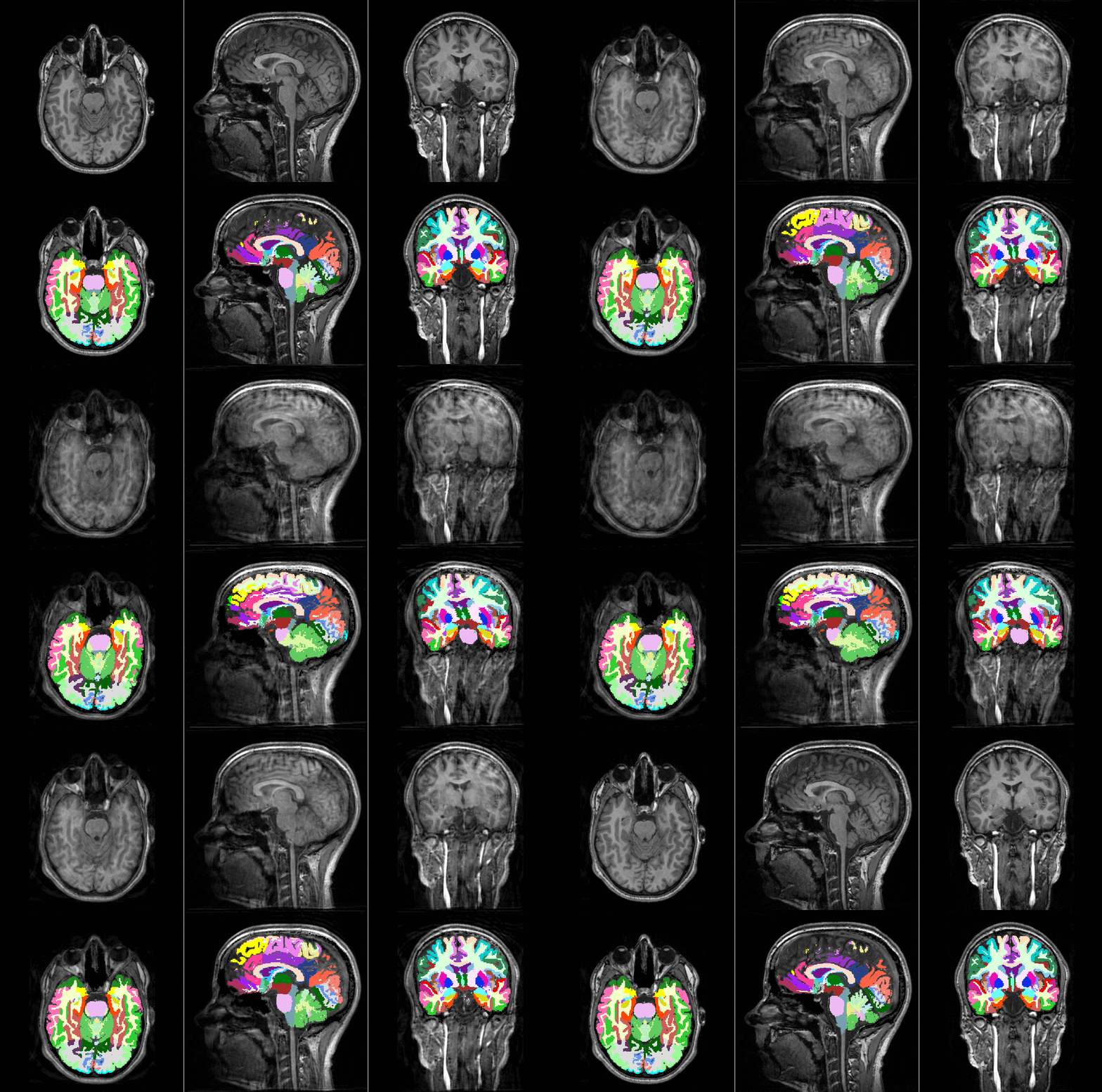
TorchIO transforms take as input instances of
Subject or
Image (and its subclasses), 4D PyTorch tensors,
4D NumPy arrays, SimpleITK images, NiBabel images, or Python dictionaries
(see Transform).
For example:
>>> import torch
>>> import numpy as np
>>> import torchio as tio
>>> affine_transform = tio.RandomAffine()
>>> tensor = torch.rand(1, 256, 256, 159)
>>> transformed_tensor = affine_transform(tensor)
>>> type(transformed_tensor)
<class 'torch.Tensor'>
>>> array = np.random.rand(1, 256, 256, 159)
>>> transformed_array = affine_transform(array)
>>> type(transformed_array)
<class 'numpy.ndarray'>
>>> subject = tio.datasets.Colin27()
>>> transformed_subject = affine_transform(subject)
>>> transformed_subject
Subject(Keys: ('t1', 'head', 'brain'); images: 3)
Transforms can also be applied from the command line using
torchio-transform.
All transforms inherit from Transform:
Transform
Bases: ABC
Abstract class for all TorchIO transforms.
When called, the input can be an instance of
torchio.Subject,
torchio.Image,
numpy.ndarray,
torch.Tensor,
[SimpleITK.Image][],
or dict containing 4D tensors as values.
All subclasses must overwrite
[apply_transform()][torchio.transforms.Transform.apply_transform],
which takes an instance of Subject,
modifies it and returns the result.
Parameters:
| Name | Type | Description | Default |
|---|---|---|---|
p
|
float
|
Probability that this transform will be applied. |
1
|
copy
|
bool
|
Make a deep copy of the input before applying the transform. |
True
|
include
|
TypeKeys
|
Sequence of strings with the names of the only images to which
the transform will be applied.
Mandatory if the input is a |
None
|
exclude
|
TypeKeys
|
Sequence of strings with the names of the images to which the
the transform will not be applied, apart from the ones that are
excluded because of the transform type.
For example, if a subject includes an MRI, a CT and a label map,
and the CT is added to the list of exclusions of an intensity
transform such as |
None
|
keep
|
dict[str, str] | None
|
Dictionary with the names of the input images that will be kept
in the output and their new names. For example:
|
None
|
parse_input
|
bool
|
True
|
|
label_keys
|
TypeKeys
|
If the input is a dictionary, names of images that correspond to label maps. |
None
|
__call__(data)
Transform data and return a result of the same type.
Parameters:
| Name | Type | Description | Default |
|---|---|---|---|
data
|
InputType
|
Instance of |
required |
Composability
Transforms can be composed to create directed acyclic graphs defining the probability that each transform will be applied.
For example, to obtain the following graph:
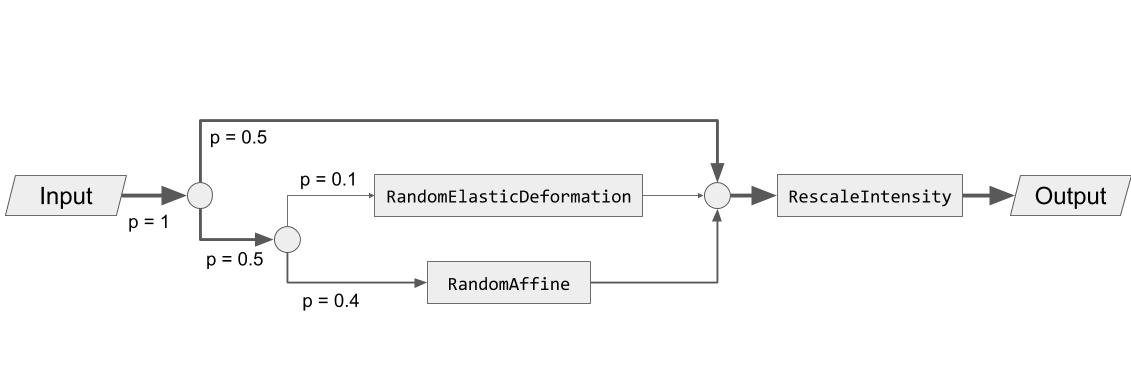
We can type:
>>> import torchio as tio
>>> spatial_transforms = {
...     tio.RandomElasticDeformation(): 0.2,
...     tio.RandomAffine(): 0.8,
... }
>>> transform = tio.Compose([
...     tio.OneOf(spatial_transforms, p=0.5),
...     tio.RescaleIntensity(out_min_max=(0, 1)),
... ])
Reproducibility
When transforms are instantiated, we typically need to pass values that will be
used to sample the transform parameters when the
__call__ method of the transform is
called, i.e., when the transform instance is called.
All random transforms have a corresponding deterministic class, that can be
applied again to obtain exactly the same result.
The Subject class contains some convenient methods to
reproduce transforms:
>>> import torchio as tio
>>> subject = tio.datasets.FPG()
>>> transforms = (
...     tio.CropOrPad((100, 200, 300)),
...     tio.RandomFlip(axes=['LR', 'AP', 'IS']),
...     tio.OneOf([tio.RandomAnisotropy(), tio.RandomElasticDeformation()]),
... )
>>> transform = tio.Compose(transforms)
>>> transformed = transform(subject)
>>> reproduce_transform = transformed.get_composed_history()
>>> reproduced = reproduce_transform(subject)
Invertibility
Inverting transforms can be especially useful in scenarios in which one needs to apply some transformation, infer a segmentation on the transformed data and apply the inverse transform to the inference in order to bring it back to the original space.
This is particularly useful, for example, for test-time augmentation or aleatoric uncertainty estimation:
>>> import torchio as tio
>>> # Mock a segmentation CNN
>>> def model(x):
...     return x
...
>>> subject = tio.datasets.Colin27()
>>> transform = tio.RandomAffine()
>>> segmentations = []
>>> num_segmentations = 10
>>> for _ in range(num_segmentations):
...     transform = tio.RandomAffine(image_interpolation='bspline')
...     transformed = transform(subject)
...     segmentation = model(transformed)
...     transformed_native_space = segmentation.apply_inverse_transform(image_interpolation='linear')
...     segmentations.append(transformed_native_space)
...
Transforms can be classified in three types, according to their degree of invertibility:
-
Lossless: transforms that can be inverted with no loss of information, such as
RandomFlip,Pad, orRandomNoise. -
Lossy: transforms that can be inverted with some loss of information, such as
RandomAffine, orCrop. -
Impossible: transforms that cannot be inverted, such as
RandomBlur.
Non-invertible transforms will be ignored by the
apply_inverse_transform method of
Subject.
Interpolation
Some transforms such as
RandomAffine or
RandomMotion
need to interpolate intensity values during resampling.
The available interpolation strategies can be inferred from the elements of
Interpolation.
'linear' interpolation, the default in TorchIO for scalar images,
is usually a good compromise between image quality and speed.
It is therefore a good choice for data augmentation during training.
Methods such as 'bspline' or 'lanczos' generate
high-quality results, but are generally slower. They can be used to obtain
optimal resampling results during offline data preprocessing.
'nearest' can be used for quick experimentation as it is very
fast, but produces relatively poor results for scalar images.
It is the default interpolation type for label maps, as categorical values for
the different labels need to preserved after interpolation.
When instantiating transforms, it is possible to specify independently the
interpolation type for label maps and scalar images, as shown in the
documentation for, e.g., Resample.
Visit the SimpleITK docs for technical documentation and Cambridge in Colour for some further general explanations of digital image interpolation.
Interpolation
Bases: Enum
Interpolation techniques available in ITK.
For a full quantitative comparison of interpolation methods, you can read Meijering et al. 1999, Quantitative Comparison of Sinc-Approximating Kernels for Medical Image Interpolation .
Examples:
NEAREST = 'sitkNearestNeighbor'
class-attribute
instance-attribute
Nearest neighbor interpolation.
LINEAR = 'sitkLinear'
class-attribute
instance-attribute
Linear interpolation.
BSPLINE = 'sitkBSpline'
class-attribute
instance-attribute
B-Spline of order 3 (cubic) interpolation.
CUBIC = 'sitkBSpline'
class-attribute
instance-attribute
Same as BSPLINE.
GAUSSIAN = 'sitkGaussian'
class-attribute
instance-attribute
Gaussian interpolation. Sigma is set to 0.8 input pixels and alpha is 4.
LABEL_GAUSSIAN = 'sitkLabelGaussian'
class-attribute
instance-attribute
Smoothly interpolate multi-label images. Sigma is set to 1 input pixel and alpha is 1.
HAMMING = 'sitkHammingWindowedSinc'
class-attribute
instance-attribute
Hamming windowed sinc kernel.
COSINE = 'sitkCosineWindowedSinc'
class-attribute
instance-attribute
Cosine windowed sinc kernel.
WELCH = 'sitkWelchWindowedSinc'
class-attribute
instance-attribute
Welch windowed sinc kernel.
LANCZOS = 'sitkLanczosWindowedSinc'
class-attribute
instance-attribute
Lanczos windowed sinc kernel.
BLACKMAN = 'sitkBlackmanWindowedSinc'
class-attribute
instance-attribute
Blackman windowed sinc kernel.