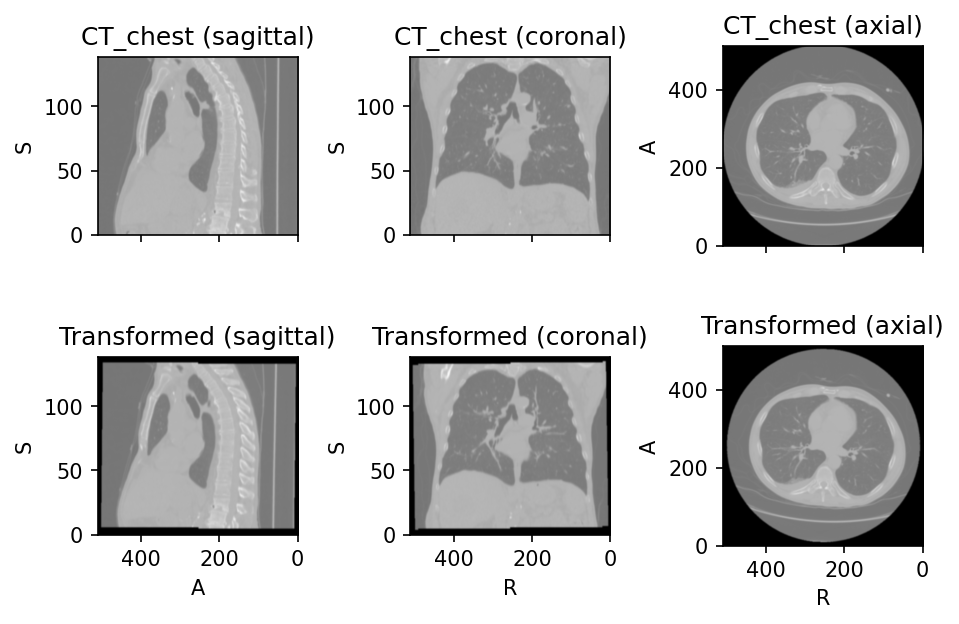
RandomAffine
RandomAffine
Bases: RandomTransform, SpatialTransform
Apply a random affine transformation and resample the image.
Parameters:
| Name | Type | Description | Default |
|---|---|---|---|
scales
|
TypeOneToSixFloat
|
Tuple \((a_1, b_1, a_2, b_2, a_3, b_3)\) defining the
scaling ranges.
The scaling values along each dimension are \((s_1, s_2, s_3)\),
where \(s_i \sim \mathcal{U}(a_i, b_i)\).
If two values \((a, b)\) are provided,
then \(s_i \sim \mathcal{U}(a, b)\).
If only one value \(x\) is provided,
then \(s_i \sim \mathcal{U}(1 - x, 1 + x)\).
If three values \((x_1, x_2, x_3)\) are provided,
then \(s_i \sim \mathcal{U}(1 - x_i, 1 + x_i)\).
For example, using |
0.1
|
degrees
|
TypeOneToSixFloat
|
Tuple \((a_1, b_1, a_2, b_2, a_3, b_3)\) defining the rotation ranges in degrees. Rotation angles around each axis are \((\theta_1, \theta_2, \theta_3)\), where \(\theta_i \sim \mathcal{U}(a_i, b_i)\). If two values \((a, b)\) are provided, then \(\theta_i \sim \mathcal{U}(a, b)\). If only one value \(x\) is provided, then \(\theta_i \sim \mathcal{U}(-x, x)\). If three values \((x_1, x_2, x_3)\) are provided, then \(\theta_i \sim \mathcal{U}(-x_i, x_i)\). |
10
|
translation
|
TypeOneToSixFloat
|
Tuple \((a_1, b_1, a_2, b_2, a_3, b_3)\) defining the
translation ranges in mm.
Translation along each axis is \((t_1, t_2, t_3)\),
where \(t_i \sim \mathcal{U}(a_i, b_i)\).
If two values \((a, b)\) are provided,
then \(t_i \sim \mathcal{U}(a, b)\).
If only one value \(x\) is provided,
then \(t_i \sim \mathcal{U}(-x, x)\).
If three values \((x_1, x_2, x_3)\) are provided,
then \(t_i \sim \mathcal{U}(-x_i, x_i)\).
For example, if the image is in RAS+ orientation (e.g., after
applying |
0
|
isotropic
|
bool
|
If |
False
|
center
|
str
|
If |
'image'
|
default_pad_value
|
str | float
|
As the image is rotated, some values near the
borders will be undefined.
If |
'minimum'
|
default_pad_label
|
int | float
|
As the label map is rotated, some values near the borders will be undefined. This numeric value will be used to fill those undefined regions. This parameter applies to label maps only. |
0
|
image_interpolation
|
str
|
See Interpolation. |
'linear'
|
label_interpolation
|
str
|
See Interpolation. |
'nearest'
|
check_shape
|
bool
|
If |
True
|
**kwargs
|
See |
{}
|
Examples:
>>> import torchio as tio
>>> image = tio.datasets.Colin27().t1
>>> transform = tio.RandomAffine(
...     scales=(0.9, 1.2),
...     degrees=15,
... )
>>> transformed = transform(image)
__call__(data)
Transform data and return a result of the same type.
Parameters:
| Name | Type | Description | Default |
|---|---|---|---|
data
|
InputType
|
Instance of |
required |
get_base_args()
Provides easy access to the arguments used to instantiate the base class
(Transform) of any transform.
This method is particularly useful when a new transform can be represented as a variant
of an existing transform (e.g. all random transforms), allowing for seamless instantiation
of the existing transform with the same arguments as the new transform during apply_transform.
Note
The p argument (probability of applying the transform) is excluded to avoid
multiplying the probability of both existing and new transform.
add_base_args(arguments, overwrite_on_existing=False)
Add the init args to existing arguments
validate_keys_sequence(keys, name)
staticmethod
Ensure that the input is not a string but a sequence of strings.
to_hydra_config()
Return a dictionary representation of the transform for Hydra instantiation.