RandomElasticDeformation
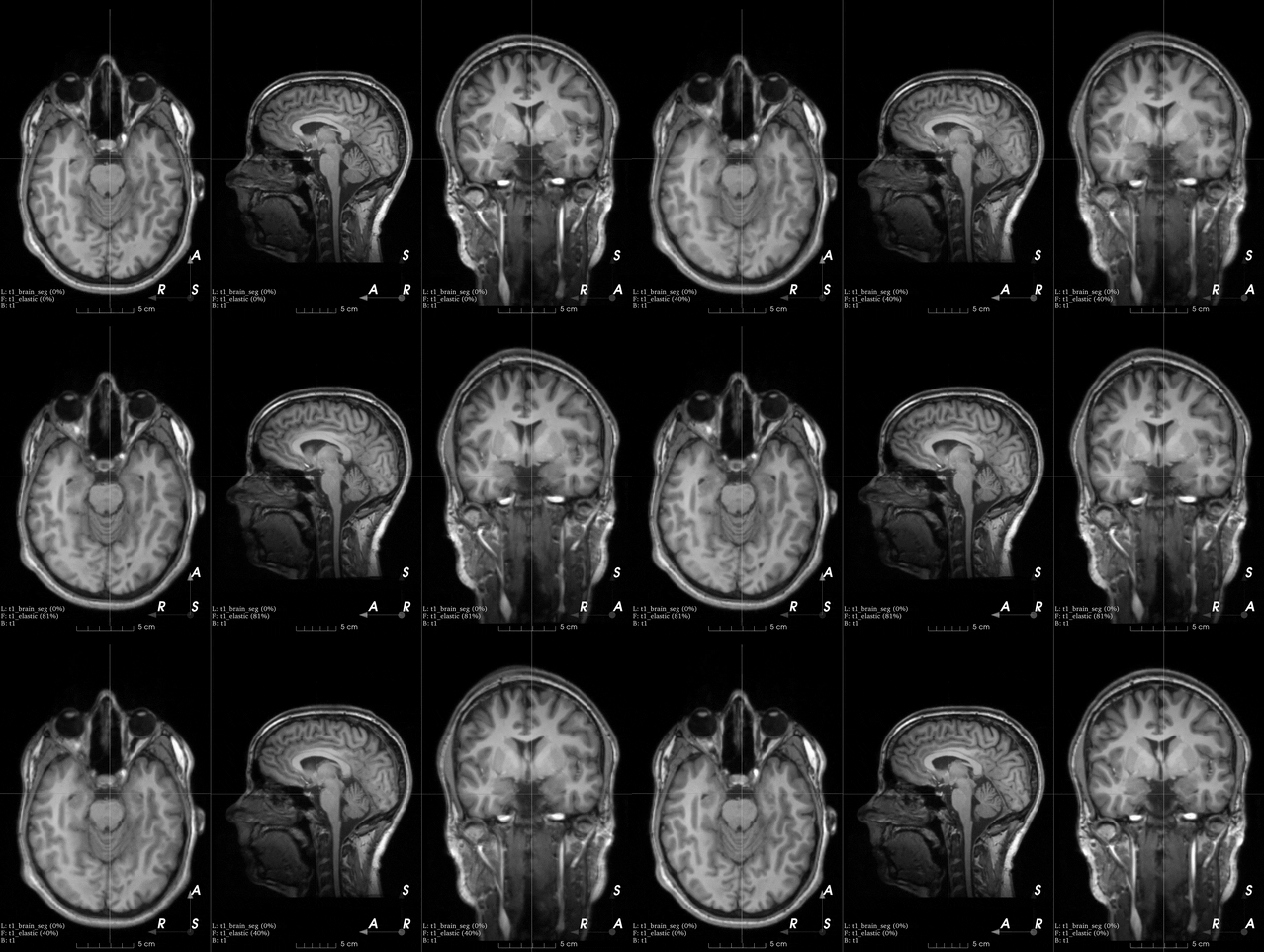
RandomElasticDeformation
Bases: RandomTransform, SpatialTransform
Apply dense random elastic deformation.
A random displacement is assigned to a coarse grid of control points around and inside the image. The displacement at each voxel is interpolated from the coarse grid using cubic B-splines.
The 'Deformable Registration' topic on ScienceDirect contains useful articles explaining interpolation of displacement fields using cubic B-splines.
Warning
This transform is slow as it requires expensive computations.
If your images are large you might want to use
RandomAffine instead.
Parameters:
| Name | Type | Description | Default |
|---|---|---|---|
num_control_points
|
int | TypeTripletInt
|
Number of control points along each dimension of
the coarse grid \((n_x, n_y, n_z)\).
If a single value \(n\) is passed,
then \(n_x = n_y = n_z = n\).
Smaller numbers generate smoother deformations.
The minimum number of control points is |
7
|
max_displacement
|
float | TypeTripletFloat
|
Maximum displacement along each dimension at each control point \((D_x, D_y, D_z)\). The displacement along dimension \(i\) at each control point is \(d_i \sim \mathcal{U}(0, D_i)\). If a single value \(D\) is passed, then \(D_x = D_y = D_z = D\). Note that the total maximum displacement would actually be \(D_{max} = \sqrt{D_x^2 + D_y^2 + D_z^2}\). |
7.5
|
locked_borders
|
int
|
If |
2
|
image_interpolation
|
str
|
See Interpolation. Note that this is the interpolation used to compute voxel intensities when resampling using the dense displacement field. The value of the dense displacement at each voxel is always interpolated with cubic B-splines from the values at the control points of the coarse grid. |
'linear'
|
label_interpolation
|
str
|
See Interpolation. |
'nearest'
|
**kwargs
|
See |
{}
|
This gist can also be used to better understand the meaning of the parameters.
This is an example from the 3D Slicer registration FAQ .
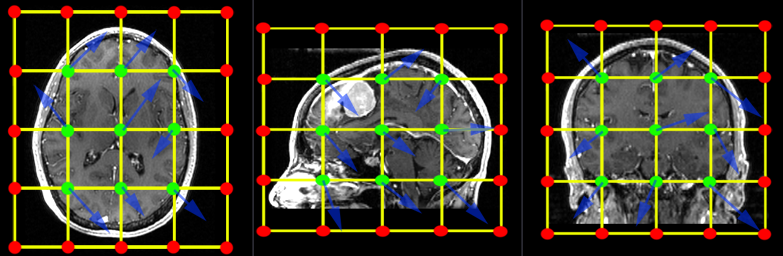
To generate a similar grid of control points with TorchIO, the transform can be instantiated as follows:
Examples:
>>> from torchio import RandomElasticDeformation
>>> transform = RandomElasticDeformation(
...     num_control_points=(7, 7, 7),  # or just 7
...     locked_borders=2,
... )
Note that control points outside the image bounds are not showed in the
example image (they would also be red as we set locked_borders
to 2).
Warning
Image folding may occur if the maximum displacement is larger than half the coarse grid spacing. The grid spacing can be computed using the image bounds in physical space and the number of control points.
Using a max_displacement larger than the computed
potential_folding will raise a RuntimeWarning.
Technically, \(2 \epsilon\) should be added to the image bounds, where \(\epsilon = 2^{-3}\) according to ITK source code.
Examples:
>>> import numpy as np
>>> import torchio as tio
>>> image = tio.datasets.Slicer().MRHead.as_sitk()
>>> image.GetSize()  # in voxels
(256, 256, 130)
>>> image.GetSpacing()  # in mm
(1.0, 1.0, 1.2999954223632812)
>>> bounds = np.array(image.GetSize()) * np.array(image.GetSpacing())
>>> bounds  # mm
array([256.        , 256.        , 168.99940491])
>>> num_control_points = np.array((7, 7, 6))
>>> grid_spacing = bounds / (num_control_points - 2)
>>> grid_spacing
array([51.2       , 51.2       , 42.24985123])
>>> potential_folding = grid_spacing / 2
>>> potential_folding  # mm
array([25.6       , 25.6       , 21.12492561])
__call__(data)
Transform data and return a result of the same type.
Parameters:
| Name | Type | Description | Default |
|---|---|---|---|
data
|
InputType
|
Instance of |
required |
get_base_args()
Provides easy access to the arguments used to instantiate the base class
(Transform) of any transform.
This method is particularly useful when a new transform can be represented as a variant
of an existing transform (e.g. all random transforms), allowing for seamless instantiation
of the existing transform with the same arguments as the new transform during apply_transform.
Note
The p argument (probability of applying the transform) is excluded to avoid
multiplying the probability of both existing and new transform.
add_base_args(arguments, overwrite_on_existing=False)
Add the init args to existing arguments
validate_keys_sequence(keys, name)
staticmethod
Ensure that the input is not a string but a sequence of strings.
to_hydra_config()
Return a dictionary representation of the transform for Hydra instantiation.