RandomGamma
RandomGamma
Bases: RandomTransform, IntensityTransform
Randomly change contrast of an image by raising its values to the power \(\gamma\).
Parameters:
| Name | Type | Description | Default |
|---|---|---|---|
log_gamma
|
TypeRangeFloat
|
Tuple \((a, b)\) to compute the exponent \(\gamma = e ^ \beta\), where \(\beta \sim \mathcal{U}(a, b)\). If a single value \(d\) is provided, then \(\beta \sim \mathcal{U}(-d, d)\). Negative and positive values for this argument perform gamma compression and expansion, respectively. See the Gamma correction Wikipedia entry for more information. |
(-0.3, 0.3)
|
**kwargs
|
See |
{}
|
Note
Fractional exponentiation of negative values is generally not
well-defined for non-complex numbers.
If negative values are found in the input image \(I\),
the applied transform is \(\text{sign}(I) |I|^\gamma\),
instead of the usual \(I^\gamma\). The
RescaleIntensity
transform may be used to ensure that all values are positive. This is
generally not problematic, but it is recommended to visualize results
on images with negative values. More information can be found on
this StackExchange question.
Examples:
>>> import torchio as tio
>>> subject = tio.datasets.FPG()
>>> transform = tio.RandomGamma(log_gamma=(-0.3, 0.3))  # gamma between 0.74 and 1.34
>>> transformed = transform(subject)
__call__(data)
Transform data and return a result of the same type.
Parameters:
| Name | Type | Description | Default |
|---|---|---|---|
data
|
InputType
|
Instance of |
required |
get_base_args()
Provides easy access to the arguments used to instantiate the base class
(Transform) of any transform.
This method is particularly useful when a new transform can be represented as a variant
of an existing transform (e.g. all random transforms), allowing for seamless instantiation
of the existing transform with the same arguments as the new transform during apply_transform.
Note
The p argument (probability of applying the transform) is excluded to avoid
multiplying the probability of both existing and new transform.
add_base_args(arguments, overwrite_on_existing=False)
Add the init args to existing arguments
validate_keys_sequence(keys, name)
staticmethod
Ensure that the input is not a string but a sequence of strings.
to_hydra_config()
Return a dictionary representation of the transform for Hydra instantiation.
arguments_are_dict()
Check if main arguments are dict.
Return True if the type of all attributes specified in the
args_names have dict type.
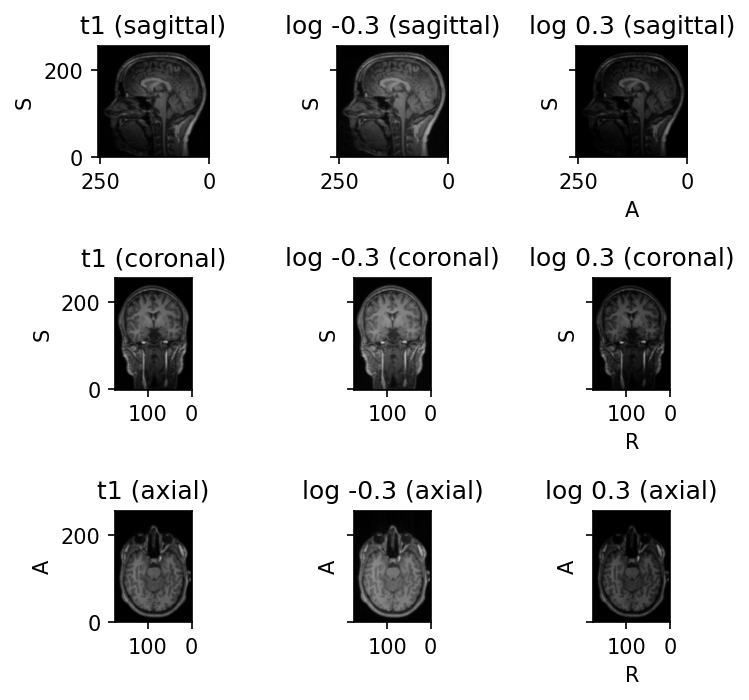
Source code
import torchio as tio
subject = tio.datasets.FPG()
subject.remove_image('seg')
transform = tio.RandomGamma(log_gamma=(-0.3, -0.3))
transformed = transform(subject)
subject.add_image(transformed.t1, 'log -0.3')
transform = tio.RandomGamma(log_gamma=(0.3, 0.3))
transformed = transform(subject)
subject.add_image(transformed.t1, 'log 0.3')
subject.plot()