Resample
Resample
Bases: SpatialTransform
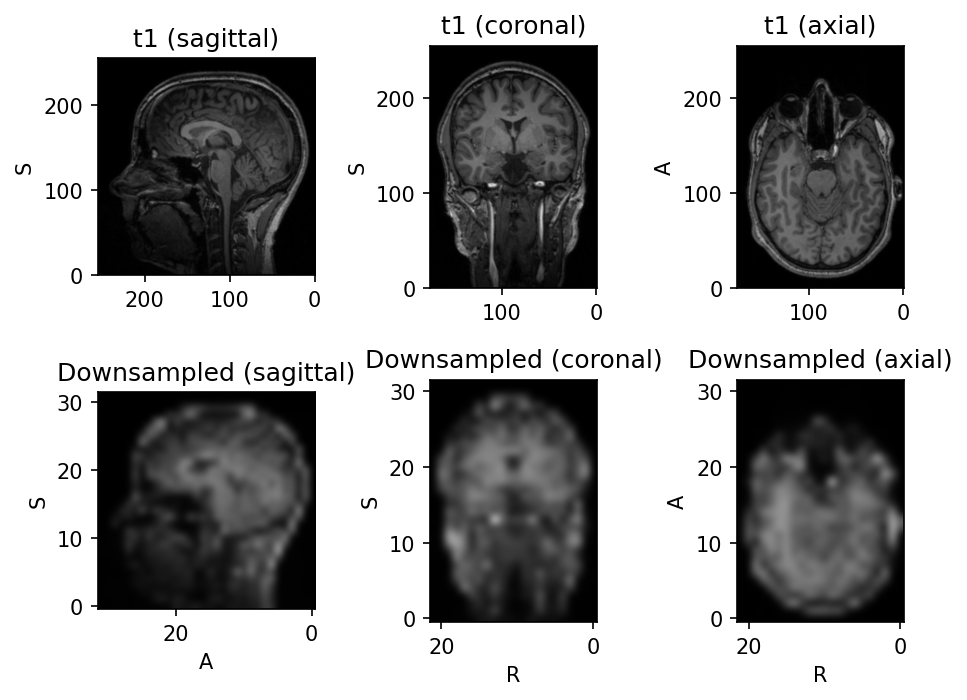
Resample image to a different physical space.
This is a powerful transform that can be used to change the image shape or spatial metadata, or to apply a spatial transformation.
Parameters:
| Name | Type | Description | Default |
|---|---|---|---|
target
|
TypeTarget
|
Argument to define the output space. Can be one of:
|
ONE_MILLIMITER_ISOTROPIC
|
pre_affine_name
|
str | None
|
Name of the image key (not subject key) storing an
affine matrix that will be applied to the image header before
resampling. If |
None
|
image_interpolation
|
str
|
See Interpolation. |
'linear'
|
label_interpolation
|
str
|
See Interpolation. |
'nearest'
|
scalars_only
|
bool
|
Apply only to instances of |
False
|
antialias
|
bool
|
If |
False
|
**kwargs
|
See |
{}
|
Examples:
>>> import torch
>>> import torchio as tio
>>> transform = tio.Resample()                      # resample all images to 1mm isotropic
>>> transform = tio.Resample(2)                     # resample all images to 2mm isotropic
>>> transform = tio.Resample('t1')                  # resample all images to 't1' image space
>>> # Example: using a precomputed transform to MNI space
>>> ref_path = tio.datasets.Colin27().t1.path  # this image is in the MNI space, so we can use it as reference/target
>>> affine_matrix = tio.io.read_matrix('transform_to_mni.txt')  # from a NiftyReg registration. Would also work with e.g. .tfm from SimpleITK
>>> image = tio.ScalarImage(tensor=torch.rand(1, 256, 256, 180), to_mni=affine_matrix)  # 'to_mni' is an arbitrary name
>>> transform = tio.Resample(colin.t1.path, pre_affine_name='to_mni')  # nearest neighbor interpolation is used for label maps
>>> transformed = transform(image)  # "image" is now in the MNI space
Note
The antialias option is recommended when large (e.g. > 2×) downsampling
factors are expected, particularly for offline (before training) preprocessing,
when run times are not a concern.
__call__(data)
Transform data and return a result of the same type.
Parameters:
| Name | Type | Description | Default |
|---|---|---|---|
data
|
InputType
|
Instance of |
required |
get_base_args()
Provides easy access to the arguments used to instantiate the base class
(Transform) of any transform.
This method is particularly useful when a new transform can be represented as a variant
of an existing transform (e.g. all random transforms), allowing for seamless instantiation
of the existing transform with the same arguments as the new transform during apply_transform.
Note
The p argument (probability of applying the transform) is excluded to avoid
multiplying the probability of both existing and new transform.
add_base_args(arguments, overwrite_on_existing=False)
Add the init args to existing arguments
validate_keys_sequence(keys, name)
staticmethod
Ensure that the input is not a string but a sequence of strings.
to_hydra_config()
Return a dictionary representation of the transform for Hydra instantiation.