Training
Patch samplers
Samplers are used to randomly extract patches from volumes.
They are called with a sample generated by a
SubjectsDataset and return a Python generator that yields
cropped versions of the sample.
For more information about patch-based training, see this NiftyNet tutorial.
- class torchio.data.UniformSampler(patch_size: int | tuple[int, int, int])[source]
Bases:
RandomSamplerRandomly extract patches from a volume with uniform probability.
- Parameters:
patch_size – See
PatchSampler.
- class torchio.data.WeightedSampler(patch_size: int | tuple[int, int, int], probability_map: str | None)[source]
Bases:
RandomSamplerRandomly extract patches from a volume given a probability map.
The probability of sampling a patch centered on a specific voxel is the value of that voxel in the probability map. The probabilities need not be normalized. For example, voxels can have values 0, 1 and 5. Voxels with value 0 will never be at the center of a patch. Voxels with value 5 will have 5 times more chance of being at the center of a patch that voxels with a value of 1.
- Parameters:
patch_size – See
PatchSampler.probability_map – Name of the image in the input subject that will be used as a sampling probability map.
- Raises:
RuntimeError – If the probability map is empty.
Example
>>> import torchio as tio
>>> subject = tio.Subject(
...     t1=tio.ScalarImage('t1_mri.nii.gz'),
...     sampling_map=tio.Image('sampling.nii.gz', type=tio.SAMPLING_MAP),
... )
>>> patch_size = 64
>>> sampler = tio.data.WeightedSampler(patch_size, 'sampling_map')
>>> for patch in sampler(subject):
...     print(patch[tio.LOCATION])
Note
The index of the center of a patch with even size \(s\) is arbitrarily set to \(s/2\). This is an implementation detail that will typically not make any difference in practice.
Note
Values of the probability map near the border will be set to 0 as the center of the patch cannot be at the border (unless the patch has size 1 or 2 along that axis).
- class torchio.data.LabelSampler(patch_size: int | tuple[int, int, int], label_name: str | None = None, label_probabilities: dict[int, float] | None = None)[source]
Bases:
WeightedSamplerExtract random patches with labeled voxels at their center.
This sampler yields patches whose center value is greater than 0 in the
label_name.- Parameters:
patch_size – See
PatchSampler.label_name – Name of the label image in the subject that will be used to generate the sampling probability map. If
None, the first image of typetorchio.LABELfound in the subject subject will be used.label_probabilities – Dictionary containing the probability that each class will be sampled. Probabilities do not need to be normalized. For example, a value of
{0: 0, 1: 2, 2: 1, 3: 1}will create a sampler whose patches centers will have 50% probability of being labeled as1, 25% of being2and 25% of being3. IfNone, the label map is binarized and the value is set to{0: 0, 1: 1}. If the input has multiple channels, a value of{0: 0, 1: 2, 2: 1, 3: 1}will create a sampler whose patches centers will have 50% probability of being taken from a non zero value of channel1, 25% from channel2and 25% from channel3.
Example
>>> import torchio as tio
>>> subject = tio.datasets.Colin27()
>>> subject
Colin27(Keys: ('t1', 'head', 'brain'); images: 3)
>>> probabilities = {0: 0.5, 1: 0.5}
>>> sampler = tio.data.LabelSampler(
...     patch_size=64,
...     label_name='brain',
...     label_probabilities=probabilities,
... )
>>> generator = sampler(subject)
>>> for patch in generator:
...     print(patch.shape)
If you want a specific number of patches from a volume, e.g. 10:
>>> generator = sampler(subject, num_patches=10)
>>> for patch in iterator:
...     print(patch.shape)
- class torchio.data.PatchSampler(patch_size: int | tuple[int, int, int])[source]
Bases:
objectBase class for TorchIO samplers.
- Parameters:
patch_size – Tuple of integers \((w, h, d)\) to generate patches of size \(w \times h \times d\). If a single number \(n\) is provided, \(w = h = d = n\).
Warning
This is an abstract class that should only be instantiated using child classes such as
UniformSamplerandWeightedSampler.
- class torchio.data.GridSampler(subject: Subject, patch_size: int | tuple[int, int, int], patch_overlap: int | tuple[int, int, int] = (0, 0, 0), padding_mode: str | float | None = None)[source]
Bases:
PatchSamplerExtract patches across a whole volume.
Grid samplers are useful to perform inference using all patches from a volume. It is often used with a
GridAggregator.- Parameters:
subject – Instance of
Subjectfrom which patches will be extracted.patch_size – Tuple of integers \((w, h, d)\) to generate patches of size \(w \times h \times d\). If a single number \(n\) is provided, \(w = h = d = n\).
patch_overlap – Tuple of even integers \((w_o, h_o, d_o)\) specifying the overlap between patches for dense inference. If a single number \(n\) is provided, \(w_o = h_o = d_o = n\).
padding_mode – Same as
padding_modeinPad. IfNone, the volume will not be padded before sampling and patches at the border will not be cropped by the aggregator. Otherwise, the volume will be padded with \(\left(\frac{w_o}{2}, \frac{h_o}{2}, \frac{d_o}{2} \right)\) on each side before sampling. If the sampler is passed to aGridAggregator, it will crop the output to its original size.
Example
>>> import torchio as tio
>>> colin = tio.datasets.Colin27()
>>> sampler = tio.GridSampler(colin, patch_size=88)
>>> for i, patch in enumerate(sampler()):
...     patch.t1.save(f'patch_{i}.nii.gz')
...
>>> # To figure out the number of patches beforehand:
>>> sampler = tio.GridSampler(colin, patch_size=88)
>>> len(sampler)
8
Note
Adapted from NiftyNet. See this NiftyNet tutorial for more information about patch based sampling. Note that
patch_overlapis twiceborderin NiftyNet tutorial.
Queue
- class torchio.data.Queue(subjects_dataset: SubjectsDataset, max_length: int, samples_per_volume: int, sampler: PatchSampler, subject_sampler: Sampler | None = None, num_workers: int = 0, shuffle_subjects: bool = True, shuffle_patches: bool = True, start_background: bool = True, verbose: bool = False)[source]
Bases:
DatasetQueue used for stochastic patch-based training.
A training iteration (i.e., forward and backward pass) performed on a GPU is usually faster than loading, preprocessing, augmenting, and cropping a volume on a CPU. Most preprocessing operations could be performed using a GPU, but these devices are typically reserved for training the CNN so that batch size and input tensor size can be as large as possible. Therefore, it is beneficial to prepare (i.e., load, preprocess and augment) the volumes using multiprocessing CPU techniques in parallel with the forward-backward passes of a training iteration. Once a volume is appropriately prepared, it is computationally beneficial to sample multiple patches from a volume rather than having to prepare the same volume each time a patch needs to be extracted. The sampled patches are then stored in a buffer or queue until the next training iteration, at which point they are loaded onto the GPU for inference. For this, TorchIO provides the
Queueclass, which also inherits from the PyTorchDataset. In this queueing system, samplers behave as generators that yield patches from random locations in volumes contained in theSubjectsDataset.The end of a training epoch is defined as the moment after which patches from all subjects have been used for training. At the beginning of each training epoch, the subjects list in the
SubjectsDatasetis shuffled, as is typically done in machine learning pipelines to increase variance of training instances during model optimization. A PyTorch loader queries the datasets copied in each process, which load and process the volumes in parallel on the CPU. A patches list is filled with patches extracted by the sampler, and the queue is shuffled once it has reached a specified maximum length so that batches are composed of patches from different subjects. The internal data loader continues querying theSubjectsDatasetusing multiprocessing. The patches list, when emptied, is refilled with new patches. A second data loader, external to the queue, may be used to collate batches of patches stored in the queue, which are passed to the neural network.- Parameters:
subjects_dataset – Instance of
SubjectsDataset.max_length – Maximum number of patches that can be stored in the queue. Using a large number means that the queue needs to be filled less often, but more CPU memory is needed to store the patches.
samples_per_volume – Default number of patches to extract from each volume. If a subject contains an attribute
num_samples, it will be used instead ofsamples_per_volume. A small number of patches ensures a large variability in the queue, but training will be slower.sampler – A subclass of
PatchSamplerused to extract patches from the volumes.subject_sampler – Sampler to get subjects from the dataset. It should be an instance of
DistributedSamplerwhen running distributed training.num_workers – Number of subprocesses to use for data loading (as in
torch.utils.data.DataLoader).0means that the data will be loaded in the main process.shuffle_subjects – If
True, the subjects dataset is shuffled at the beginning of each epoch, i.e. when all patches from all subjects have been processed.shuffle_patches – If
True, patches are shuffled after filling the queue.start_background – If
True, the loader will start working in the background as soon as the queue is instantiated.verbose – If
True, some debugging messages will be printed.
This diagram represents the connection between a
SubjectsDataset, aQueueand theDataLoaderused to pop batches from the queue.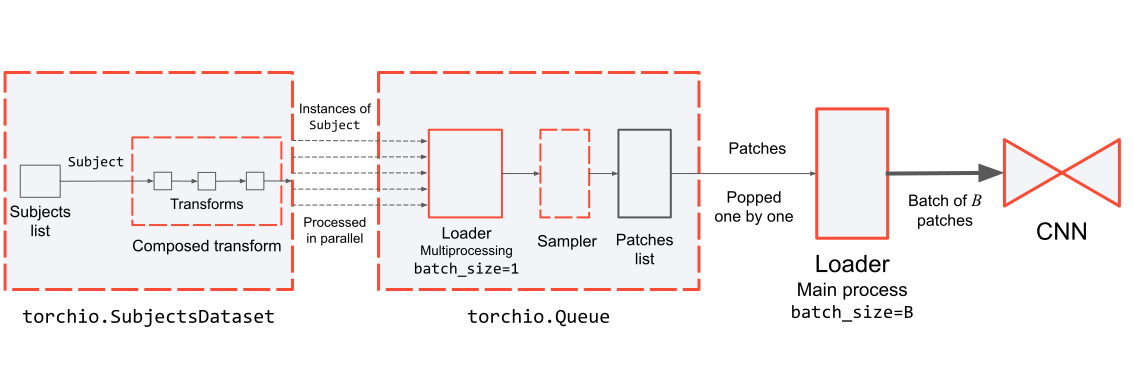
This sketch can be used to experiment and understand how the queue works. In this case,
shuffle_subjectsisFalseandshuffle_patchesisTrue.Note
num_workersrefers to the number of workers used to load and transform the volumes. Multiprocessing is not needed to pop patches from the queue, so you should always usenum_workers=0for theDataLoaderyou instantiate to generate training batches.Example:
>>> import torch
>>> import torchio as tio
>>> patch_size = 96
>>> queue_length = 300
>>> samples_per_volume = 10
>>> sampler = tio.data.UniformSampler(patch_size)
>>> subject = tio.datasets.Colin27()
>>> subjects_dataset = tio.SubjectsDataset(10 * [subject])
>>> patches_queue = tio.Queue(
...     subjects_dataset,
...     queue_length,
...     samples_per_volume,
...     sampler,
...     num_workers=4,
... )
>>> patches_loader = tio.SubjectsLoader(
...     patches_queue,
...     batch_size=16,
...     num_workers=0,  # this must be 0
... )
>>> num_epochs = 2
>>> model = torch.nn.Identity()
>>> for epoch_index in range(num_epochs):
...     for patches_batch in patches_loader:
...         inputs = patches_batch['t1'][tio.DATA]  # key 't1' is in subject
...         targets = patches_batch['brain'][tio.DATA]  # key 'brain' is in subject
...         logits = model(inputs)  # model being an instance of torch.nn.Module
Example:
>>> # Usage with distributed training
>>> import torch.distributed as dist
>>> from torch.utils.data.distributed import DistributedSampler
>>> # Assume a process running on distributed node 3
>>> rank = 3
>>> patch_sampler = tio.data.UniformSampler(patch_size)
>>> subject = tio.datasets.Colin27()
>>> subjects_dataset = tio.SubjectsDataset(10 * [subject])
>>> subject_sampler = dist.DistributedSampler(
...     subjects_dataset,
...     rank=local_rank,
...     shuffle=True,
...     drop_last=True,
... )
>>> # Each process is assigned (len(subjects_dataset) // num_processes) subjects
>>> patches_queue = tio.Queue(
...     subjects_dataset,
...     queue_length,
...     samples_per_volume,
...     patch_sampler,
...     num_workers=4,
...     subject_sampler=subject_sampler,
... )
>>> patches_loader = tio.SubjectsLoader(
...     patches_queue,
...     batch_size=16,
...     num_workers=0,  # this must be 0
... )
>>> num_epochs = 2
>>> model = torch.nn.Identity()
>>> for epoch_index in range(num_epochs):
...     subject_sampler.set_epoch(epoch_index)
...     for patches_batch in patches_loader:
...         inputs = patches_batch['t1'][tio.DATA]  # key 't1' is in subject
...         targets = patches_batch['brain'][tio.DATA]  # key 'brain' is in subject
...         logits = model(inputs)  # model being an instance of torch.nn.Module